
How To Save / Download Images
Step 1: Decide where you want to store them. Be sure you put it someplace easy to find later, in your Pictures folder might be a good spot.
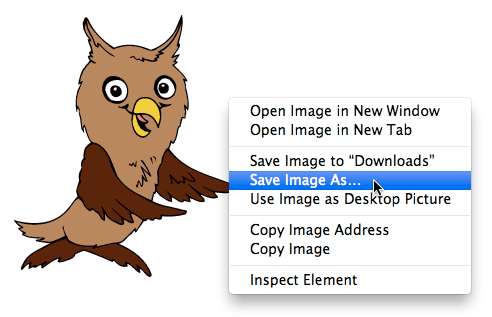
Step 2: Right-click (or command click for some Mac users) over the image and you'll see a pop-up menu similar to the one below. Click on "Save Picture As" or "Save Image As...". The wording will vary slightly depending which browser / OS you're using.
Note: If you're saving a background from Webweaver, save it from the small image on the page, not the pop open preview. The preview window has a different menu. For all other images it's best to save from the pop open preview so you'll get the full sized picture.
Step 3: From there you'll get a window asking where you want to save it. Yours may look slightly different since these screenshots were taken on a Mac but the Windows version is similar enough that you'll be able to follow along.
If it's already at the folder you want to store the image in, click save and you're done. If not, go to step 4.
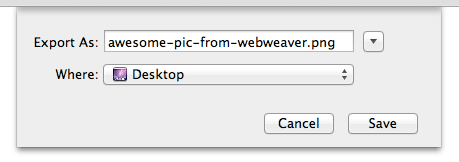
Step 4: Open the sidebar to choose which folder you'd like to store the images.
OSX, click the downward pointing arrow beside the image name top open the larger 'save' window, in Windows, click the arrow that says 'Browse Folders' in the lower left hand corner to get something similar to this:
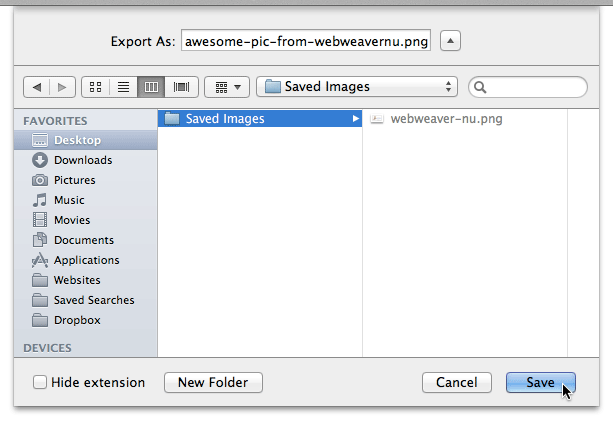
Step 5: Click "Save" and you're done!
Some Things to Keep in Mind:
- When saving pictures to your computer you may rename them but be sure to keep the file ending the same (.jpg, .gif, .png etc.) otherwise animated images may lose the animation and others may break completely.
- To keep things simple, I'd suggest keeping the names lowercase if you intend to use them on the web since most servers are case sensitive.
- Please consider linking to Webweaver or telling your friends so that they can find free images as well, either on Facebook, Twitter, Pinterest or in real life (sorry, I can't link to that last one ;)). I'd really appreciate it and it helps keep this site free. Thanks!